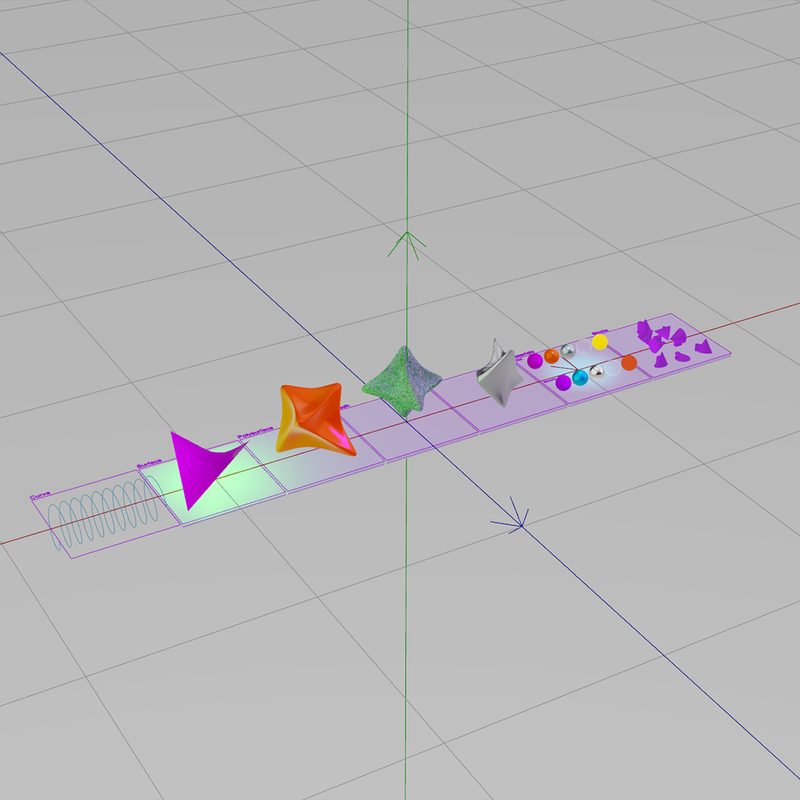
VL.Rhino exposes Rhino geometry, layers, and user strings as live data inside vvvv gamma, with a bidirectional bridge to Grasshopper at runtime. Built for installations, architectural visualisation, and parametric realtime systems.
vvvv gamma 7.2Rhino 7 / 8 (for Grasshopper link only)GrasshopperRhino.Compute.NET 8Stride (built into vvvv)
Where Grasshopper ends
Built for runtime, not just design time.
Rhino and Grasshopper are where geometry and parametric logic get built. The moment that result has to keep running, react to live input, render, and drive hardware, you need a runtime environment. That runtime is vvvv, and VL.Rhino is the bridge between the two.
What's in the box
Geometry, metadata, materials, live data.
Six things VL.Rhino does, all native inside vvvv.
Geometry Nodes
Curves, surfaces, breps, meshes, SubDs, and point clouds as native vvvv types. No format conversion, no intermediate exports.
Layers & User Strings
Filter, group, and drive logic from data embedded in your Rhino model. The same layer structure and metadata you authored in Rhino, accessible as live inputs.
PBR Material Pipeline
Base color, normal, metallic-roughness, occlusion, and emissive maps converted automatically. Embedded textures extracted directly from the .3dm. No separate texture files.
Grasshopper Live-Link
Bidirectional data exchange with Grasshopper via shared memory. Change sliders from vvvv, read GH outputs in realtime. Wire-compatible with the VLinkGH plugin.
Rhino.Compute
Run NURBS operations server-side via Rhino.Compute. Local server for development, hosted endpoint for production. Bearer token support for compute.rhino3d.com.
Blocks & GPU Instancing
Block definitions including nested blocks render efficiently via GPU instancing. Architectural and product scenes with thousands of repeated parts stay realtime.
BIM-style metadata
Data attached to geometry. Read in your patch.
Every Rhino object can carry user strings, arbitrary key/value metadata. VL.Rhino exposes those strings as a queryable input, alongside layer hierarchy and material assignment. Filter by Material=Concrete, toggle visibility per layer, drive show logic from values authored in Rhino.
User StringsLayer HierarchyMaterial DictionaryVisibilityObject NamesBounding Boxes
What it's for
Four scenarios where VL.Rhino does something other workflows can't.
Scenarios drawn from production projects, not marketing fiction.
Generative Installations
Parametric geometry stays in Rhino and Grasshopper. Show logic, sensor input, and output to lights, motors, and projection mapping live in vvvv. Both sides see changes in realtime. No FBX exports, no stale meshes.
Architectural Realtime Visualisation
Import the building model, filter by user strings, toggle layers, animate construction phases. Combine with sensor or BMS input, something neither Twinmotion nor Enscape can do.
NURBS Configurators
Compute parametric geometry exactly on the kernel, server-side via Rhino.Compute, and show it as a high-resolution mesh. Not the coarse curve-as-polyline approximation web configurators settle for. Suitable for jewellery, furniture, and product design where curve precision matters.
Designer-Authored XR
VR and AR projects where geometry and materials originate in Rhino instead of Unity or Unreal. Lower the entry barrier for design teams. Full PBR pipeline, no game-engine workflows required.
Read and write
Simulate the show, then run it for real.
vvvv doesn't only read your model. It drives the physical world: DMX lighting, motors, projection mapping. The Rhino model becomes a working digital twin of the installation.
Lay out your LED positions or fixtures in Rhino, map and test the whole show against the real geometry in vvvv, then drive the actual hardware from that same model in production. One source for simulation and control, not two.
In motion
See it work.
How VL.Rhino connects Rhino's geometry kernel to vvvv's realtime pipeline.
Getting Started
Installation & First Steps
~8 min · youtube.com
Tutorial
Grasshopper Live-Link Setup
~12 min · coming soon
Advanced
Geometry in the Stride Renderer
~15 min · coming soon
Pricing
Simple licensing. No subscriptions.
Perpetual license with 1 year of updates included. Bring it to renewal when you need newer versions, or keep using your current version forever.
For students, academic research, and personal study. Non-commercial use only. Academic verification required via email. Please get in touch for more information.
New to VL.Rhino? The open-source VL.Rhino.3dm reads .3dm geometry for free. VL.Rhino does everything else.
Prices include 19% German VAT. EU business customers: reverse charge applies automatically at checkout with a valid VAT ID. Third-country buyers: net pricing.
· Update renewals available after the first year.
· University & institution licenses on
request.
Large installation? Enterprise project?
If your project needs more than 10 Deployment Devices or 5 Developer Seats, drop us a line at hello@wolfmoritzcramer.de. We offer fair, project-based pricing for large-scale installations, agencies, and enterprise use. We'll figure out a license that fits your scope.
Frequently asked questions
What counts as a Deployment Device?
Any machine that loads and runs VL.Rhino at runtime, whether that's a development PC, a media server in an installation, or an exported .exe running on a kiosk. Your own development machine counts too.
Do exported executables need their own license?
No additional license per executable. The machine that runs the executable counts as one Deployment Device under your license.
What if I exceed the device limit temporarily?
For short-term events (festivals, exhibitions) we trust your honest declaration. If you regularly operate above the limit, get in touch, we'll find a fair solution rather than block you.
Can I move my license between machines?
Yes. Decommissioned devices free up a slot for new ones.
Do you offer subscriptions?
No. Perpetual license with 1 year of updates. After the update year, your existing version keeps working forever. You only pay again if you want newer versions.
Is this a Rhino plugin?
No. VL.Rhino runs in vvvv gamma and uses rhino3dm to read .3dm files directly. No Rhino installation needed for geometry import. The Grasshopper Live-Link feature requires a separate Rhino 7 or 8 installation.
Quick Start
From purchase to first patch.
Four steps. No external NuGet feed required.
01 —
Purchase & Download
Complete checkout. The download link to the VL.Rhino NuGet package arrives by email, usually within a minute.
02 —
Save the package locally
Save the .nupkg file into a folder of your choice, for example C:\vvvv\nuget. No public feed setup, no account configuration.
03 —
Install via command line
Open a terminal in the same folder and run the install command from your order email. The local folder is the package source.
VL.Rhino grew out of larger client projects: installations, configurators, realtime visualisation systems. For custom integrations, bespoke pipelines, or specific workflow questions:
Built by Wolf Moritz Cramer, Creative Technologist based in Hamburg.